
You can attach a set of reference files to a specific scorecard so the AI uses them as the source of truth when scoring and coaching on role-play recordings.
This improves accuracy because the AI can verify facts, numbers, specs, and product details against your documents instead of guessing or relying only on the prompt.
How to add a Knowledge Base
1. Open the relevant role-play
2. Click the three dots menu next to the Scorecard
3. Select Edit Knowledge Base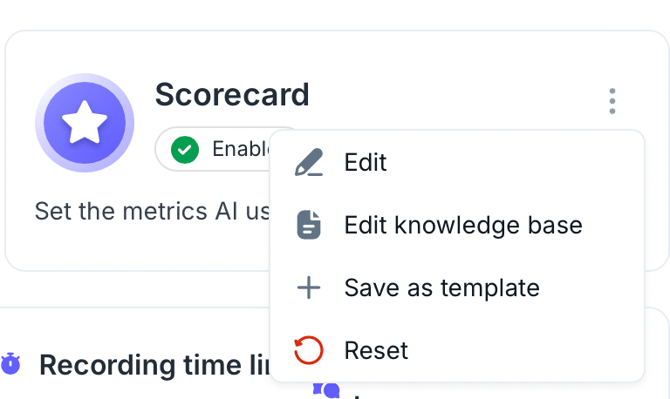
4. Upload your files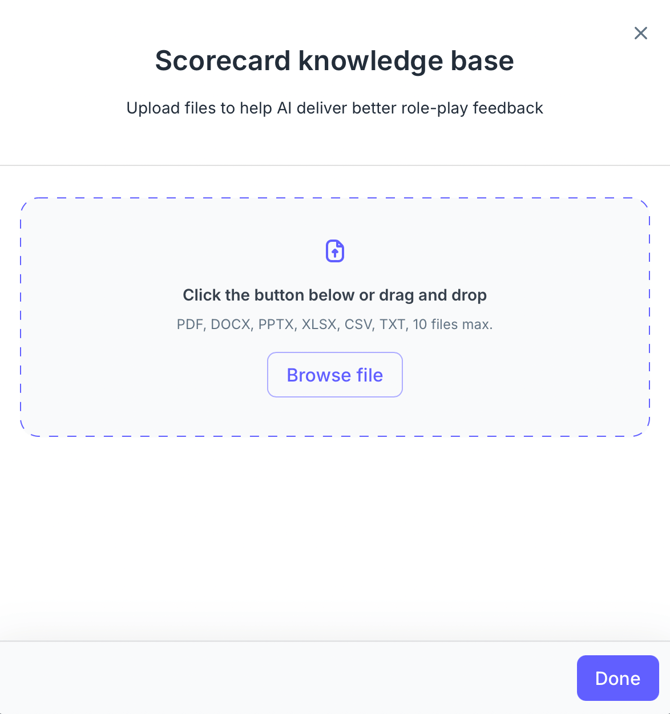
5. Click Done
How it works
Once files are attached:
-
The AI references them during scoring and coaching
-
If a user states incorrect canonical information (for example pricing, specs, or performance numbers), the AI can detect the mismatch
-
Feedback is generated based on the attached documents
Example: If a rep says “0 to 100 km/h in 5 seconds,” but your product sheet states “4 seconds,” the AI can flag the discrepancy and coach accordingly.
You can attach up to 10 files per scorecard. Knowledge bases are not shared across scorecards. Each scorecard has its own set of files, so you can use different documents for different scorecards.
Supported formats include PDF, DOCX, PPTX, XLSX, CSV, TXT, and you can mix formats within the same scorecard.
At the moment, files attached to a scorecard are available only for the scorecard inside that role-play. They are not included in the scorecard template library yet. This is planned for a later update.